
Patch Management
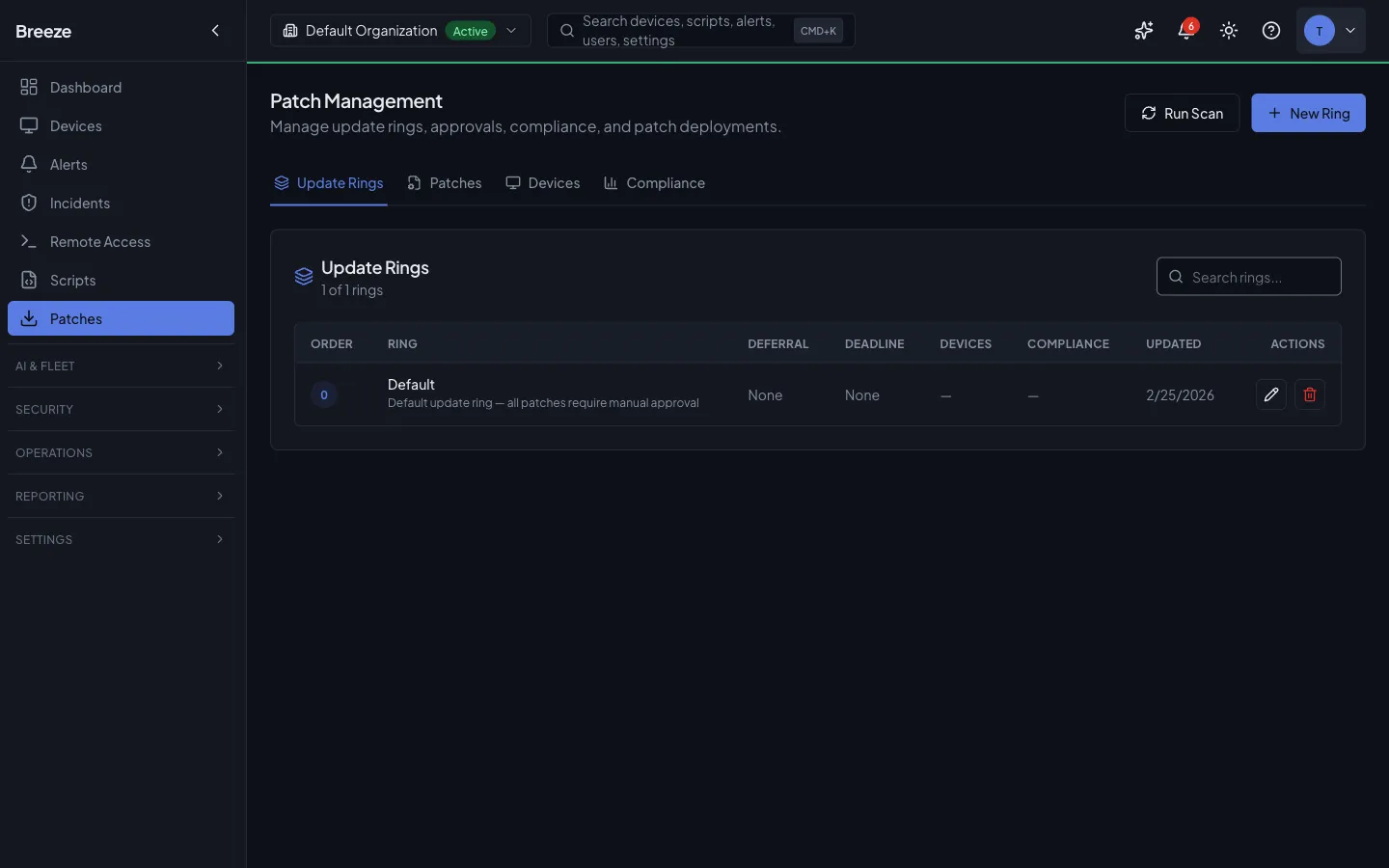
Patch Management gives you full control over the complete update lifecycle for every device in your fleet: discover available patches, review and approve them, deploy to targets, and roll back if something goes wrong. The system is designed to make large-scale patching auditable and safe — every action is recorded, partial failures are surfaced immediately, and no patch reaches a device without an explicit approval step.
Every patch goes through an approval workflow before it can be deployed. Approvals are scoped per organization, which means MSPs can manage each customer’s patch posture independently. A patch approved for one customer is not automatically approved for another, and rejections or deferrals in one organization do not affect any other.
Compliance reports give you a point-in-time snapshot of your fleet’s patch status, suitable for internal audit reviews and customer-facing reporting. Reports are generated asynchronously and can be exported as CSV or PDF.
Key Concepts
Section titled “Key Concepts”Patch Sources
Section titled “Patch Sources”| Source | Description |
|--------|-------------|
| microsoft | Windows Update patches sourced from Microsoft, including cumulative updates, security fixes, and optional feature updates |
| apple | macOS and iOS system updates distributed through Apple Software Update |
| linux | Distribution packages managed via the native package manager (apt, yum, dnf, zypper, etc.) |
| third_party | Updates for non-OS applications (browsers, runtimes, productivity tools) detected via winget on Windows devices. Enriched with vendor metadata and CVE data through the Third-Party Package Catalog |
| custom | Internally published updates distributed through Breeze’s custom patch channel |
Severity Levels
Section titled “Severity Levels”| Severity | Meaning |
|----------|---------|
| critical | Security-critical vulnerability; immediate patching strongly recommended |
| important | High-priority fix addressing a significant security or stability issue |
| moderate | Standard update improving security or reliability without urgent exposure |
| low | Minor improvement or non-security fix with minimal operational impact |
| unknown | Severity not yet classified by the patch source |
Approval States
Section titled “Approval States”| State | Meaning |
|-------|---------|
| pending | Not yet reviewed; patch will not be deployed until approved |
| approved | Cleared for deployment; eligible for inclusion in patch jobs |
| rejected | Explicitly declined via POST /patches/:id/decline — will not be installed. Non-destructive; can be reversed by approving the patch at any time. |
| deferred | Postponed until the deferUntil date; returns to pending automatically when that date is reached |
Device Patch Status
Section titled “Device Patch Status”| Status | Meaning |
|--------|---------|
| pending | Patch detected on the device but not yet installed |
| installed | Patch successfully applied |
| failed | Installation attempted but returned an error |
| skipped | Patch was not applied during a job run (e.g., device was rebooting or a dependency was missing) |
| missing | Patch is approved and should be present but is not detected on the device |
Third-Party Application Patching
Section titled “Third-Party Application Patching”Beyond operating-system updates, Breeze patches third-party applications detected via winget on Windows devices — browsers, runtimes, and productivity tools such as Chrome, Firefox, Edge, Zoom, Teams, Git, Node.js, Python, and Visual Studio Code. These patches flow through the same approval, deployment, and rollback workflow as OS patches.
The Package Catalog
Section titled “The Package Catalog”A curated package catalog standardises metadata for known third-party applications. It ships pre-seeded with around 20 common applications, and platform admins manage it at Admin → Third-Party Catalog.
Each catalog entry pairs a winget package ID with a vendor, friendly name, category, and a default severity. When a device reports an available third-party update, Breeze matches it to the catalog so the patch shows the correct vendor and a sensible severity even before any vulnerability data is available. Updates from applications not in the catalog still appear in the patches list, but without this enrichment.
To add or edit an entry:
-
Go to Admin → Third-Party Catalog.
-
Click Add package, or the edit icon on an existing row.
-
Set the winget package ID, vendor, friendly name, and default severity. Optionally add a homepage link, notes, and — to enable CVE lookups — an OSV ecosystem name (see below).
-
Save. The catalog updates immediately and future third-party patches from that vendor are enriched.
Deleting an entry removes future enrichment for that vendor but does not delete patches that were already detected.
CVE Enrichment from OSV.dev
Section titled “CVE Enrichment from OSV.dev”Breeze automatically enriches third-party patches with vulnerability data from OSV.dev, a free public vulnerability database. For any catalog entry that has an OSV ecosystem configured, a background job queries OSV roughly once a day, attaches the matching CVE identifiers to the patch, and raises the patch’s severity if OSV reports a higher rating than the catalog default.
In the Patches list, patches with known vulnerabilities show red CVE chips beneath the patch title (the first few CVEs, with a “+N more” indicator). Each chip links to the corresponding entry in the NIST National Vulnerability Database. Source filter chips at the top of the list let you narrow to Microsoft, Apple, Linux, or third-party patches and show the count for each.
Smoke Testing Releases (Optional)
Section titled “Smoke Testing Releases (Optional)”Breeze can optionally run an AI-assisted smoke test on a third-party release before you roll it out widely. The test installs the release via winget on a dedicated Windows test VM and uses an AI model to judge whether the upgrade succeeded from the command output.
Smoke testing is off by default and only runs when the platform operator has configured a test VM. When enabled for a catalog entry (the Breeze-tested option), a re-test can be triggered manually:
-
Go to Admin → Third-Party Catalog.
-
On a Breeze-tested entry, click the re-test action and enter the version to test.
-
The result — pass, fail, inconclusive, or skipped (when no test VM is configured) — appears in the entry’s Last test column within a few minutes.
A smoke test verifies installation only; it is not a substitute for validating the release in your own environment.
Scanning for Patches
Section titled “Scanning for Patches”Trigger an on-demand patch scan by posting to /patches/scan with a list of device IDs. The source field is optional — omit it to scan all sources.
POST /patches/scan{ "deviceIds": ["uuid-1", "uuid-2"], "source": "microsoft"}The response includes:
deviceCount— number of accessible devices queuedqueuedCommandIds— all successfully queued command IDsdispatchedCommandIds— subset dispatched via active WebSocket connectionspendingCommandIds— subset queued but not yet dispatched (device offline)failedDeviceIds— devices that could not be queuedskipped.missingDeviceIds— device IDs not foundskipped.inaccessibleDeviceIds— devices outside org access scope
Scanning is asynchronous. The scan command is sent to the agent on each target device, which then reports its results back to the API. New patches appear in GET /patches after the devices have processed and returned their results — this typically takes a few minutes depending on fleet size and network conditions.
Reviewing and Approving Patches
Section titled “Reviewing and Approving Patches”For all approval endpoints below, orgId is accepted either in the JSON body (as shown) or as the ?orgId= query parameter. Organization-scoped tokens auto-resolve orgId. An optional ringId field (UUID) ties the approval to a specific deployment ring; if you don’t pass it, approvals are not ring-scoped and the response returns ringId: null.
Approving
Section titled “Approving”POST /patches/:id/approve{ "orgId": "uuid", "ringId": "ring-uuid", "note": "Reviewed — approved for production fleet"}Rejecting
Section titled “Rejecting”POST /patches/:id/decline{ "orgId": "uuid", "note": "Known conflict with legacy app"}Rejection creates an audit record but is not a permanent block. The stored approval status is rejected. A rejected patch can be approved at any time by calling the approve endpoint. No data is deleted when a patch is rejected.
Deferring
Section titled “Deferring”POST /patches/:id/defer{ "orgId": "uuid", "deferUntil": "2026-03-01T00:00:00Z", "note": "Wait for Q1 change window"}A deferred patch returns to pending status automatically when the deferUntil date is reached. No manual action is required to reactivate it.
Bulk Approval
Section titled “Bulk Approval”POST /patches/bulk-approve{ "orgId": "uuid", "patchIds": ["uuid-1", "uuid-2"], "note": "March cycle approval"}The response contains two arrays:
{ "approved": [...], "failed": [...] }Partial success is possible. Patches that could not be approved (e.g., already in a terminal state for this org) are returned in failed with a reason. Successfully approved patches are returned in approved.
Deploying Patches
Section titled “Deploying Patches”Patch Jobs
Section titled “Patch Jobs”A patch job is the unit of work that delivers approved patches to a set of devices. Jobs can be created automatically from a Configuration Policy patch schedule or manually via the UI or API. Each job targets a specific set of devices; when a job runs, the platform sends an install_patches command to each target device via its active WebSocket connection.
Devices must be online (WebSocket connected) to receive the install command. If a device is offline when a job runs, it will be marked as pending within the job and will not receive the command until it reconnects, depending on how the job is configured.
Monitoring Jobs
Section titled “Monitoring Jobs”GET /patches/jobs?status=runningEach job record includes the following progress fields:
| Field | Description |
|-------|-------------|
| devicesTotal | Total number of target devices in the job |
| devicesCompleted | Devices that have finished (success or failure) |
| devicesFailed | Devices that reported a patch installation failure |
| devicesPending | Devices that have not yet received or responded to the command |
Job status follows this lifecycle:
scheduled → running → completed / failed / cancelledRollback
Section titled “Rollback”To roll back an installed patch, post to the rollback endpoint:
POST /patches/:id/rollback{ "reason": "Causing boot failures on Intel systems", "scheduleType": "immediate", "deviceIds": ["uuid-1"]}The response includes:
queuedCommandIds— list ofrollback_patchescommands dispatched to target devicesdeviceCount— number of devices targetedfailedDeviceIds— devices that could not be reached or queued
Rollback status follows this lifecycle:
pending → running → completed / failed / cancelledCompliance Reporting
Section titled “Compliance Reporting”Generating a Report
Section titled “Generating a Report”Compliance reports are generated asynchronously. Call the report endpoint with your desired filters — the response is immediate and contains a reportId to track progress:
GET /patches/compliance/report?orgId=uuid&source=microsoft&severity=critical&format=csvResponse:
{ "reportId": "uuid", "status": "pending" }The initial status is pending. Note: the creation response may show queued as a display hint, but polling via GET /patches/compliance/report/:id will return pending until the worker picks up the job.
Available query parameters: orgId, source, severity, format (csv only — PDF is not yet supported).
Checking Report Status
Section titled “Checking Report Status”Poll the status endpoint using the reportId returned above:
GET /patches/compliance/report/:idResponse fields:
| Field | Description |
|-------|-------------|
| status | Current state: pending, running, completed, or failed |
| rowCount | Number of rows in the report (available once completed) |
| summary | High-level counts by status (available once completed) |
| startedAt | ISO 8601 timestamp when processing began |
| completedAt | ISO 8601 timestamp when processing finished |
| errorMessage | Populated only if status is failed |
Downloading the Report
Section titled “Downloading the Report”Once the report status is completed, download the file:
GET /patches/compliance/report/:id/downloadThis returns a file stream in CSV format. Attempting to download before the report is completed will return an error.
Real-Time Compliance Summary
Section titled “Real-Time Compliance Summary”For a live overview without generating a file, use the compliance summary endpoint:
GET /patches/complianceThis returns compliancePercent (a value from 0 to 100) and aggregated counts broken down by device patch status. Results are computed in real time from the current state of the fleet and are not cached.
Patch Scheduling via Configuration Policies
Section titled “Patch Scheduling via Configuration Policies”Patch scheduling and settings — when to scan, which severities to auto-approve, and what reboot policy to apply — are managed through Configuration Policies. This is the primary way to automate patching at scale. The legacy PATCH /patch-policies and DELETE /patch-policies routes have been removed; GET /patch-policies remains for backwards compatibility only.
Adding a patch feature to a policy
Section titled “Adding a patch feature to a policy”POST /configuration-policies/:policyId/featuresContent-Type: application/json
{ "featureType": "patch", "inlineSettings": { "sources": ["microsoft", "third_party"], "autoApprove": true, "autoApproveSeverities": ["critical", "important"], "scheduleFrequency": "weekly", "scheduleTime": "02:00", "scheduleDayOfWeek": "sun", "rebootPolicy": "if_required" }}Patch settings fields
Section titled “Patch settings fields”| Field | Type | Description |
|-------|------|-------------|
| sources | string[] | Patch sources to include: microsoft, apple, linux, third_party, custom |
| autoApprove | boolean | Automatically approve patches matching the configured severities |
| autoApproveSeverities | string[] | Severities eligible for auto-approval: critical, important, moderate, low |
| scheduleFrequency | string | How often to run patching: daily, weekly, or monthly |
| scheduleTime | string | Time of day in HH:MM format (24-hour, UTC unless timezone configured at site level) |
| scheduleDayOfWeek | string | For weekly schedules: sun, mon, tue, wed, thu, fri, sat |
| scheduleDayOfMonth | integer | For monthly schedules: day 1–31 |
| rebootPolicy | string | Post-patch reboot behavior: never, if_required, or always |
Patch settings inherit through the hierarchy. A device with a more specific policy override uses those settings rather than the parent policy’s settings. Use GET /configuration-policies/:id/resolve-patch-config/:deviceId to see the effective resolved config for a specific device.
Creating a patch deployment job from a policy
Section titled “Creating a patch deployment job from a policy”Once a policy has patch settings configured, deploy patches to a set of devices:
POST /configuration-policies/:id/patch-jobContent-Type: application/json
{ "deviceIds": ["uuid-1", "uuid-2", "uuid-3"], "name": "March Critical Patches — Contoso HQ", "scheduledAt": "2026-03-01T02:00:00Z"}deviceIds— required; up to 500 per jobname— optional; defaults to"Config Policy Patch Job — {policy name}"scheduledAt— optional ISO 8601 datetime; defaults to immediately
Devices currently inside an active Maintenance Window with patching suppression enabled are excluded and returned in skipped.maintenanceSuppressedDeviceIds. Devices that don’t exist or are outside your org scope are returned in skipped.missingDeviceIds and skipped.inaccessibleDeviceIds.
The response includes the IDs of all created jobs, total device counts, and skipped device lists.
API Reference
Section titled “API Reference”| Method | Path | Description |
|--------|------|-------------|
| GET | /patches | List patches with approval status (?source=&severity=&os=&orgId=) |
| GET | /patches/sources | List available patch sources (?os=) |
| GET | /patches/:id | Get full patch details |
| POST | /patches/scan | Trigger patch scan on devices |
| GET | /patches/approvals | List approval records (?status=&patchId=&orgId=) |
| POST | /patches/:id/approve | Approve patch |
| POST | /patches/:id/decline | Reject patch |
| POST | /patches/:id/defer | Defer patch to date |
| POST | /patches/bulk-approve | Approve multiple patches |
| GET | /patches/jobs | List patch deployment jobs (?status=) |
| POST | /patches/:id/rollback | Roll back installed patch |
| GET | /patches/compliance | Real-time compliance summary |
| GET | /patches/compliance/report | Request compliance report (async) |
| GET | /patches/compliance/report/:id | Check report status |
| GET | /patches/compliance/report/:id/download | Download completed report |
| GET | /third-party-catalog | List catalog entries (?vendor=&breezeTested=&search=) — platform admin |
| POST | /third-party-catalog | Create a catalog entry — platform admin |
| GET | /third-party-catalog/:id | Get a catalog entry — platform admin |
| PATCH | /third-party-catalog/:id | Update a catalog entry — platform admin |
| DELETE | /third-party-catalog/:id | Delete a catalog entry — platform admin |
| POST | /third-party-catalog/:id/test | Queue a smoke test for a Breeze-tested entry (body { "version": "..." }) — platform admin |
The GET /patches response includes source (microsoft, apple, linux, third_party, custom), and for third-party patches also version, vendor, and a cveIds array populated by OSV enrichment. Filter to a single source with ?source=third_party.
Troubleshooting
Section titled “Troubleshooting”Scan results not appearing. Scanning is asynchronous — allow a few minutes for devices to report back. Confirm the device was online at scan time. If a device was offline when the scan was dispatched, the scan will run on its next connection to the platform.
Patch approved but not deploying. Approval does not automatically trigger a deployment. Once a patch is approved, it becomes eligible for installation, but a patch job must still be scheduled — either via a Configuration Policy schedule or by creating a job manually through the UI or API.
Rollback failed.
The patch’s uninstallCommand returned a non-zero exit code on the target device. Check the errorMessage field on the rollback record for the specific error output. Note that some patches, particularly certain cumulative OS updates, do not support programmatic uninstall and cannot be rolled back through this mechanism.
Compliance percentage lower than expected.
Check for devices with failed or missing patch status — these reduce the compliance score. Also verify that the relevant patches are in approved state for the organization in question. Unapproved patches are not deployed and show as pending, which counts against compliance.
Compliance report stuck in running.
Check the background queue worker status in your infrastructure. The compliance report worker is a separate worker process from the main API worker. If that worker is down or backlogged, reports will remain in running or pending indefinitely. Restarting the compliance worker will resume processing.